The evaluation graph
The evaluation graph is the map of the game. It lives in the analysis panel, Eval view (Cmd + Option + I if the panel is hidden). Each point is a move; the curve rises when White takes the advantage, falls when Black does.
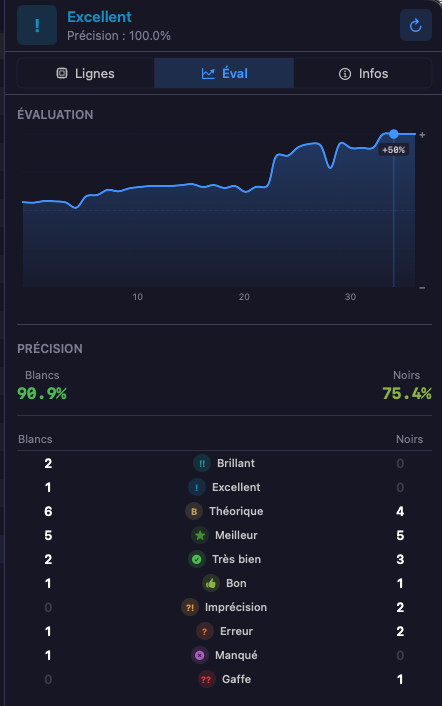 A game summarized at a glance: balance, swing, collapse.
Winning percentage rather than centipawns
Régence expresses evaluation as a winning percentage — “at this point, this side wins this position N times out of 100” — rather than in “centipawns”, the engines’ technical unit. It’s the same number used to grade moves: a Blunder is a move that makes this percentage drop brutally.
The practical benefit: winning percentage tells extreme positions better. Going from +8 to +5 “pawns” of advantage changes almost nothing (the position is still winning) — and the graph stays flat. The eye is only drawn to what matters.
Using it to navigate
The graph is clickable: clicking a point brings the board to that move. The most effective review method takes three gestures:
- Spot the steepest drop in the graph.
- Click just before the drop — see the position while it was still holdable.
- Step forward one move (
→) to see the faulty move, then compare with the engine lines.
The evaluation bar
Along the board, a vertical bar shows the evaluation of the displayed position — white on top when White is better. It moves live during navigation: useful to feel the evaluation without taking your eyes off the board.
When nobody can win any more
Some positions can no longer be mated, even with the opponent’s cooperation: two lone kings, king and bishop against king, bishops on the same color squares. Showing “0.0” there would mislead — it announces a balance still to be played where the split is already settled.
The bar then shows ½, and the status bar under the board names it: “Draw — insufficient material”. The detail comes on hover.
It’s a note, not a block: moves stay legal, and an endgame study passes through that state as soon as the last pawn falls. Nothing stops.
The time profile
Below the graph, the Eval tab offers a second reading of the game: the time profile — one row per move, with a bar proportional to the thinking time spent on it (light bar for White, dark for Black). Clicking a row brings the board to that move, exactly like the graph.
This profile tells what the evaluation cannot: where the game was played in your head. Long bars flag the positions that demanded real calculation; a blunder played in two seconds and a blunder played after three minutes of thought are not the same mistake — the first is a discipline problem, the second a calculation problem.
Thinking time is reconstructed from the clocks recorded in the game: the difference between two successive clock readings of the same player, increment included. The section therefore only appears when the game carries those clocks — which is the case for games imported from your Lichess and chess.com accounts via the monthly archives, and for PGN files carrying the [%clk] directive.