Reading and editing
A study opens like a game: the board in the center, the move tree on the right — and from the trained color’s point of view: a “facing the London” study opens from Black’s side. Régence follows the Played side setting of the studies browser, or detects the color automatically; Cmd + F remains free to flip the board at any time.
Everything that holds for a game’s variations and annotations holds here — playing a move creates a branch, Cmd + ↑ promotes, Cmd + E comments, arrows and chips guide you between lines. The difference is one of intent: in a study, the tree is the work.
Building the tree
The basic gesture: lay down your main line, then step back (←) and play the important opposing replies — each opens a branch, where your prepared continuation goes. Comments (Cmd + E) carry the memory: “avoid Qg4 here”, “the idea: f5 before Nf3”. A healthy work plan: one branch = one opposing reply = one lesson.
Reading comments
The comment button in the MOVES header controls how notes are shown, in three states: hidden, two-line excerpts, then full text in paragraphs — enough to read a heavily annotated study like an article. All three apply everywhere, variations included: each note there is prefixed by the move it comments on, and clicking it takes you to that move.
The opening explorer is this work’s natural companion — it shows, position by position, what masters play and what amateurs play; the engine lines validate the continuations.
Building from the keyboard, with the engine
The fastest method never touches the mouse. At the end of a line, where the study still stops:
Tabto the BEST LINES zone of Preview — the panel’s ↗ toggle draws the three arrows,↓/↑pick the line;Shift + →plays it out in translucent pieces so you can judge it,Escapeto come back;- convinced?
→plays the move for real — and since the lines recompute at every position, pressing again extends the line move after move. The branch writes itself under your fingers.
The same → works with any followed source — the theory book, a collection of a master’s games: the study gets built by copying living knowledge, without a single click.
Crossroads
A repertoire lives by its decision points: here the opponent has three replies, there you hesitate between two continuations. Stacked as they are, these sibling branches look alike — same indent, same color — and the eye loses track of which one answered what.
So Régence groups them in a frame titled by the move they replace: INSTEAD OF 3.Bb5 · 3 options. Each option carries its letter — A, B, C — and the color that links it to its arrow on the board. Clicking the title takes you back to the original move, the shared starting point.
Beyond the second level of nesting, sub-crossroads arrive collapsed, announced by their count, and unfold with a click. The branch you are currently walking, however, always stays open.
When the study has been analyzed, the frame gains the note ranked: the best continuation moves to the top, and what each option is worth shows in a column aligned to the right.
Reader mode
The Reader mode button in the toolbar turns the study into a full-frame book: the interactive board on one side, the unfolded tree with its comments on the other, like the pages of a theory volume. Clicking any move in the text brings the board to the position; keyboard navigation follows your shortcuts, and at crossroads, a continuations bar below the board lists the possible moves.
The study’s arrows and colored squares also show in Reader mode, synchronized with the current position — and can be drawn there with the same gestures as on the main board (right-click and drag for an arrow, right-click for a square).
It’s the evening-review mode — the one where you browse your repertoire instead of editing it.
A top bar adds the branch analysis control there: run the pass, follow it, then read what each line is worth at its end.
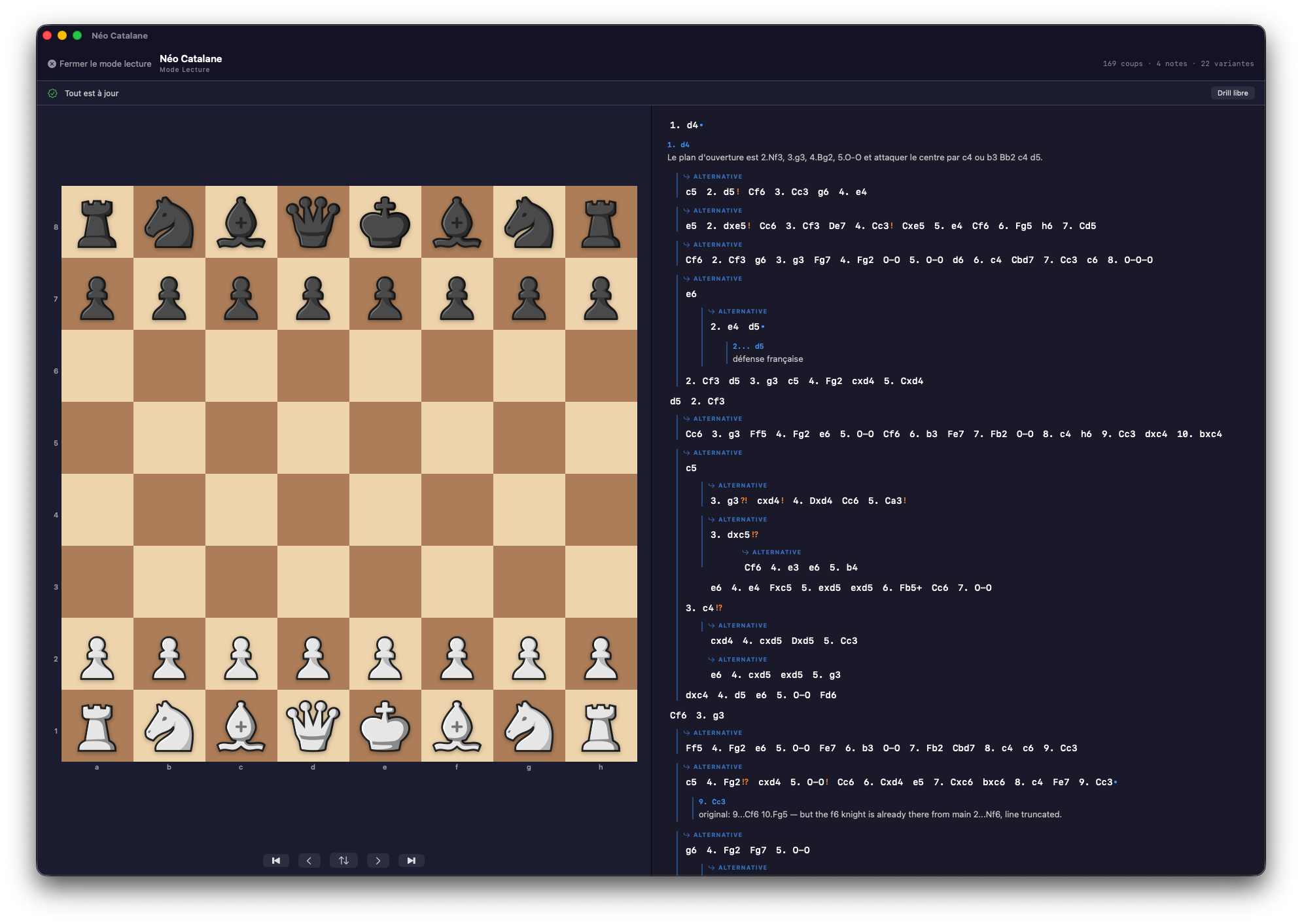 Reader mode: the study reads like a theory book, board in hand.
Snapshots
Régence protects your studies on its own: before every overwrite, a snapshot of the current state is created automatically. The history opens via Game > Study snapshots… (Cmd + Ctrl + I) — and any previous state restores in one click.
The position editor
For a study that doesn’t start from move one — endgames, typical positions, exercises — the position editor builds any position, piece by piece or from a pasted FEN. It opens from its dedicated button in the analysis toolbar, starting from the displayed position.
Everything is adjustable:
- The piece palette: clicking a square places the selected piece; ⌥‑click flips the color of the placed piece. The piece and color selectors change what you drop.
- Side to move — White or Black.
- Castling rights — O‑O / O‑O‑O for each side, as checkboxes.
- Counters — the 50-move rule and the move number.
- Clear · Starting position · Mirror — start from an empty board, the initial position, or reflect the position.
- The FEN field, at the bottom: paste a FEN and Load, or copy the FEN of the position being built.
A live validation tells you whether the position is legal (“Position valid — ready to apply”). Then Analyze on the board opens it in analysis, or Copy as image exports a diagram (see Exporting a position as an image).