Variations and annotations
The engine shows its lines — but real understanding comes from trying your own. Régence keeps everything played on the board in a variation tree, with comments and notes.
Creating a variation
Nothing to activate: playing a different move from any position creates a variation. The move list shows it indented — sub-variations too, indented and colored by depth, however deep the tree goes.
A few gestures to organize the tree, all in the Game menu:
| Action | Menu | Shortcut |
|---|---|---|
| Promote the variation to main line | Promote to main line | Cmd + ↑ |
| Move the variation up one rank | Promote the variation | Cmd + Shift + ↑ |
| Delete the move (and what follows) | Delete the move | ⌫ |
| Delete the whole variation | Delete the variation | Shift + ⌫ |
Cmd + Z undoes any tree operation — deleting a variation is never irreversible.
Finding your way: what the board shows
As soon as a position offers several continuations, Régence makes them visible everywhere the eye lands:
- Arrows on the board: every available continuation is drawn in its own color. Clicking an arrow’s destination square plays that continuation — the most direct way to branch off.
- The breadcrumb, above the board: inside a variation, it shows the full path from the main line, and every step is clickable to jump back up.
- The lines bar, below the board: the current branch’s sibling lines as clickable chips, and the possible continuations at decision points.
- The move list: a ⑂N badge marks moves that offer N alternative continuations — the tooltip lists them — and sub-variations unfold in place, recursively.
- The analysis panel: an Alternative lines section, above the engine lines, sums up each continuation on a single row — its dot matches the color of its arrow on the board, hovering opens a mini-board, clicking plays it. The section collapses with a click on its title.
One thread ties it all together: hovering a chip or a row shows its move as a ghost piece on the board and highlights its whole line in the move list — you see where you’re going before you go.
A decision point: every continuation has its arrow, its chip and its row — clicking any of them plays the line.
Navigating with the keyboard
The principle fits in one sentence: ←/→ move along the line, ↓/↑ change lines.
The → key follows the chosen path: once a line is taken — through a click, a chip or ↓ — it plays it out end to end, until you change lines. No more steering every junction.
↓ and ↑ change lines, depending on the context:
- At a decision point,
↓designates a continuation without playing it: its arrow stands alone on the board, a ghost piece lands on its destination square — except on a capture, where the arrow speaks for itself so the captured piece stays visible — and its line is highlighted in the move list.→plays it;↓again moves to the next one. - Inside a line with siblings,
↓/↑switch immediately to the neighboring line, at the same depth.
Between designation and commitment, a moment to look: Shift + → unfolds the designated continuation as ghost pieces, like an engine line — Escape folds it back, → actually commits.
Two half-move companions: Tab cycles between the alternatives of the current half-move (on a black move, the position’s black replies), and Option + Tab / Option + Shift + Tab switch tree variations at any time, even when a Preview uses Tab for its own lines.
The ↓/↑ shortcuts (“Next / previous variation”) can be remapped in Settings > Shortcuts, like the rest of the navigation.
Commenting a move
Game > Edit comment… (Cmd + E) attaches a comment to the current move. Comments live in the game: they’re exported with the PGN, and preserved on import — those of an imported Lichess study arrive intact.
Arrows and colored squares
To show an idea on the board — a plan, a weak square, a threat — Régence draws arrows and colors squares, right from a right-click, just like on Lichess or chess.com:
- Right-click and drag from one square to another draws an arrow.
- Right-click on a square (without dragging) places a circle around it.
- Repeating the exact same gesture erases that arrow or circle — it’s a toggle.
- Left-click on the board clears all annotations for the position.
Pick the color by holding a key during the right-click:
| Key | Color |
|---|---|
| (none) | red |
Shift | green |
Option | blue |
Control | yellow |
Two details that matter for teaching. First, annotations are attached to the position, not to the board: they follow the move in the tree and reappear each time you return to it — so you can mark up a whole game, move by move. Second, they’re exported with the PGN (standard %cal for arrows, %csl for squares): an annotated game keeps its arrows on Lichess, chess.com or any other tool — and those from an imported PGN arrive intact.
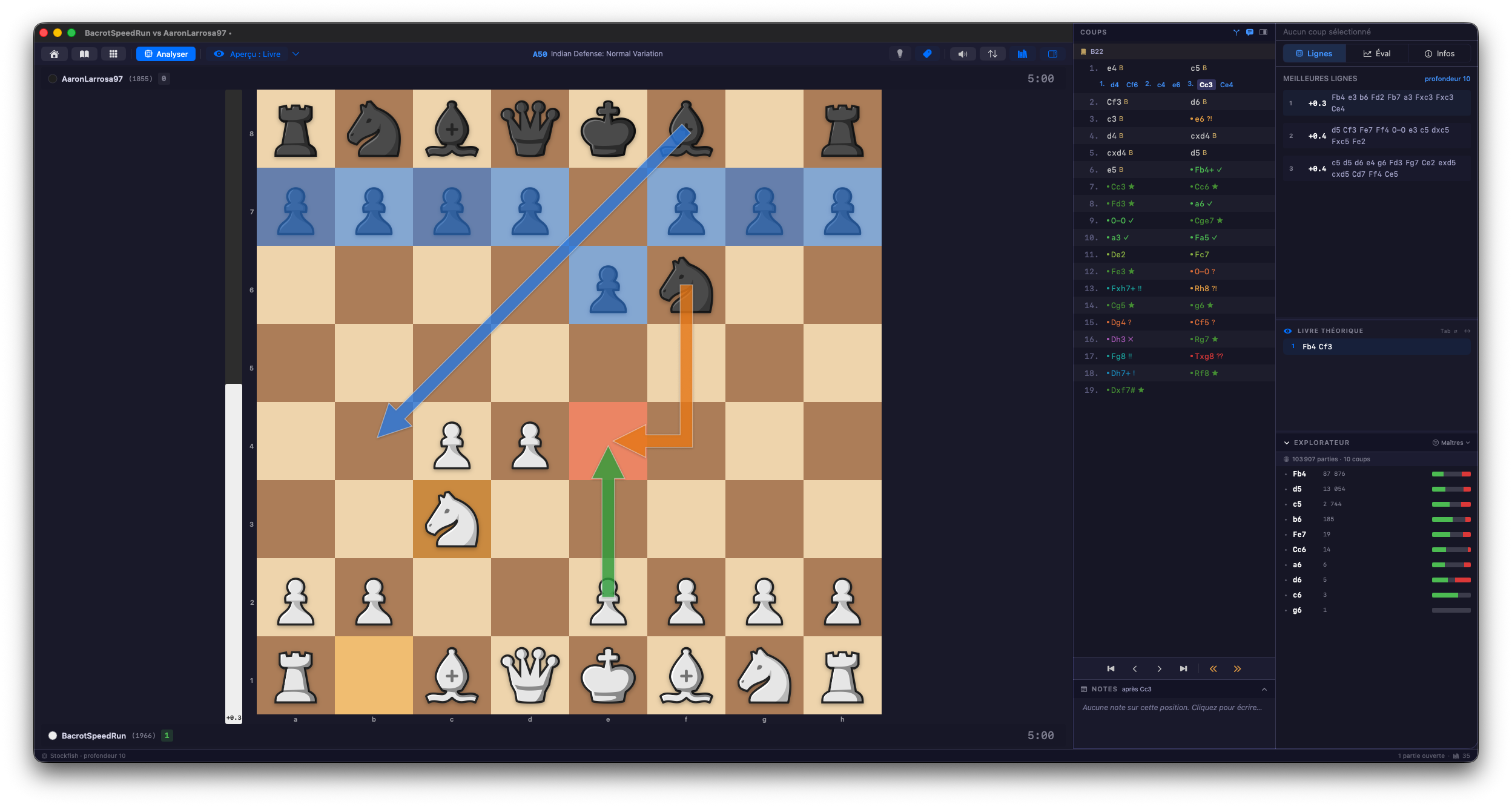 Arrows and colored squares map out a plan directly on the position.
Position notes
Below the move list, the Notes panel takes free-form remarks about the displayed position — “I panicked here”, “review this rook plan”. The difference with comments: notes are a personal notebook per position, meant for review, while comments are part of the game and travel with it.