Preview mode
The analysis panel reads the game after the fact. Preview mode works upstream, right on the board: it plays out, in translucent pieces, the expected continuation from the current position.
There is nothing to switch on: on an open game, Preview is always ready and waiting for a gesture. The Preview selector in the toolbar answers one question only — what gets projected when you unfold a line?:
| Source | What gets projected |
|---|---|
| Engine | Stockfish’s best line |
| Book | The opening’s theoretical continuation |
| Study | The line from one of your studies |
| Whole folder | Every study in a folder at once — each line shows which study it comes from |
| Collection | The most played move in a collection of your games |
| Review | The analysis’s best line at the current faulty move — see below |
The selector always shows the current source — Preview: Engine, Preview: Closed Sicilian, Preview: 📁 White repertoire. As soon as anything other than the Engine is followed, the menu’s first item becomes Stop following: <source> — one click back to the Engine; re-clicking the active source in its list does the same, and re-clicking an already-active Engine clears the combined sources. And it doesn’t stop at one: the Combine submenu adds sources on top of the one already chosen. The label then picks up a +2 suffix, the panel opens on a MULTI-SOURCE · n active header, and every line carries a badge saying where it comes from. The panel only shows what doesn’t already have a home: studies, folders, collections and the book — the tree’s continuations stay in the move list, engine lines in BEST LINES. The Tab cycle still walks through everything.
Whatever the source, everything lands in a single list: the projected lines cycle with Tab, and the continuations from the study’s or game’s own tree appear there too, badged Continuation — so Preview shows side by side what the engine says, what the book says… and what your own tree has prepared.
Project, then come back
The projection is never switched on: a gesture triggers it, and a gesture leaves it.
| Gesture | What it does |
|---|---|
Shift + → | Unfolds the chosen line, move by move — Shift + ← steps back |
Tab / Shift + Tab | Moves to another zone: tree continuations, engine, review, book, a given study, a given collection… |
↓ / ↑ | Move to another line within the zone |
Cmd + Option + G | Projects the current line — and, pressed again, returns to the real position while keeping that line at hand |
| Clicking a move in the panel | Projects the line up to that move |
| Double-clicking a move in the panel | Unfolds the line as an ephemeral variation in the move list, up to that move (also in the context menu) |
Return after Shift + → | Writes the stepped-through line up to the position shown, and takes you there |
Escape | Returns to the real position; a second Escape releases Preview and gives Tab back to the tree’s variations |
That’s the whole difference between the two ways out: Cmd + Option + G keeps the chosen line ready to pick up again, Escape resets it. Ordinary navigation (←, →) also leaves the projection — and in every case, the game itself is never modified.
Building a line from the keyboard
One exception, and it has to be armed: at the very end of the game, when there is no next move at all, → can play the followed line’s first move for real. Press it repeatedly and the sequence writes itself into the game, without touching the mouse — the fastest way to build a study out of an engine line.
Powerful, hence off by default: one arrow key too many at the end of a game would create a move you never meant to play.
Three doors, one state:
- the → button in the toolbar, to the right of the Arrows and Badges buttons — lit when building is armed;
- the Analysis menu > → builds the followed line;
- the Preview menu, at the bottom of the source list.
Anywhere other than the very end of the game, → stays navigation whether armed or not: a move is never written in the middle of a game.
Zones and lines: two gestures, two scales
Preview lines aren’t a flat list but zones, one per source. Tab steps from zone to zone; ↓/↑ walk the lines of the zone you’re in. And above all: the zone survives moving through the game. Pick the “collection” zone, play ten moves forward — you’re still in the collection, on its first line for the new position. No more rebuilding your context at every half-move.
Under the board, the status band
A fixed strip under the board always says where you are: Preview · Continuation B (3/7) · step 2 — which line is followed, which one out of how many in its zone, at which step of the projection. Whatever “home” the line comes from (engine, study, collection…), the information is always in the same place.
The ↗ convention: multi-arrows, the same everywhere
This is the landmark of the application: every lines panel carries the same ↗ icon in its header, with the same meaning everywhere.
| ↗ | Off | On |
|---|---|---|
| BEST LINES | the best arrow only | the three lines as arrows, decreasing opacities |
| Continuations from here | the arrow of the selected continuation (else the main one) | every continuation as tinted arrows |
| Preview panel (collection, studies, book) | the followed line’s arrow | every corpus line, matching tinted numbers |
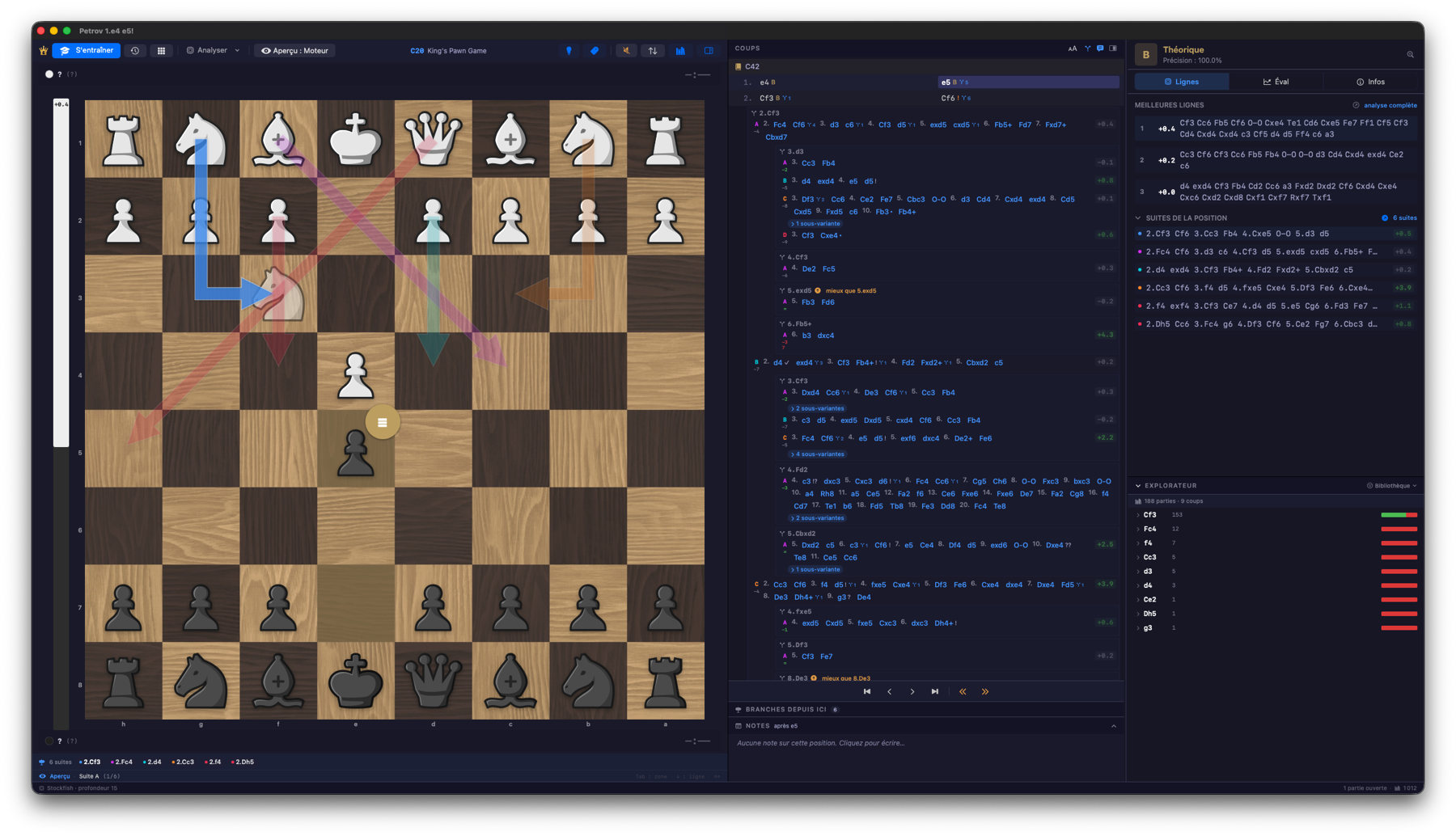 ↗ toggle on, on a Petrov study: all six continuations as tinted arrows, the followed one (2.Nf3, blue) standing out — and the status band announcing “Continuation A (1/6)”.
Three rules complete the convention:
- One family of arrows at a time — the board speaks the language of the followed zone. And clicking ↗ is a choice: the clicked panel takes the floor, the other family goes quiet.
- ↗ off is not zero arrows: the current selection keeps its own. To silence every helper arrow, use the toolbar’s Arrows button, None mode (
Icycles through the modes). Its other modes: Auto (the study’s continuations, otherwise the engine), Engine (the green arrow by default) and Study (the continuations by default). A zone chosen withTabalways overrides these two modes. - The settings are remembered, like panel widths.
Score pills
Every line in the panel also carries its pill: Stockfish flash-evaluates the position at the end of the line (depth 12 — a compass, not an analysis). The number uses the White convention, as everywhere; the colour follows the value: green favourable to White, grey equal, amber then red as it leans towards Black.
Follow a player
On a collection, every other move belongs to the opponent — following the raw collection mixes both sides. The Follow a player section of the Preview menu lists the collection’s most frequent accounts: pick one, and only their games feed the lines — the ones where they held the colour at the bottom of your board. Board with White at the bottom: their White repertoire, their moves and the opponents’ replies as they actually came; flip the board and you switch to their Black repertoire. All moves restores the raw behaviour, and the choice is remembered per collection.
Better still: when one account appears in nearly every game — a “Bacrot SpeedRun” collection, typically — it is followed automatically, without a click.
It’s the dream tool on a master’s game base: the Preview lines become their lived repertoire, statistics included.
The Review: the best move, in one gesture
On an analyzed game, stop on a move marked Inaccuracy, Mistake or Blunder and press Shift + →: the best line immediately projects as ghost pieces on the board, from the position before the fault. Shift + → unfolds the line move by move, Tab moves on to the other available lines, Escape returns to the real position — the game itself is never modified, it’s a pure projection.
It’s the fastest gesture of the whole review: no panel to read, no variation to create — the answer to “what should have been played?” appears on the board, instantly, because it comes from the already-computed analysis.
The same Shift + → serves away from faulty moves too: a tree continuation designated with ↓/↑ unfolds as ghost pieces in exactly the same way — Escape folds it back, → actually commits to it. The details of that mechanism are on the Variations and annotations page.
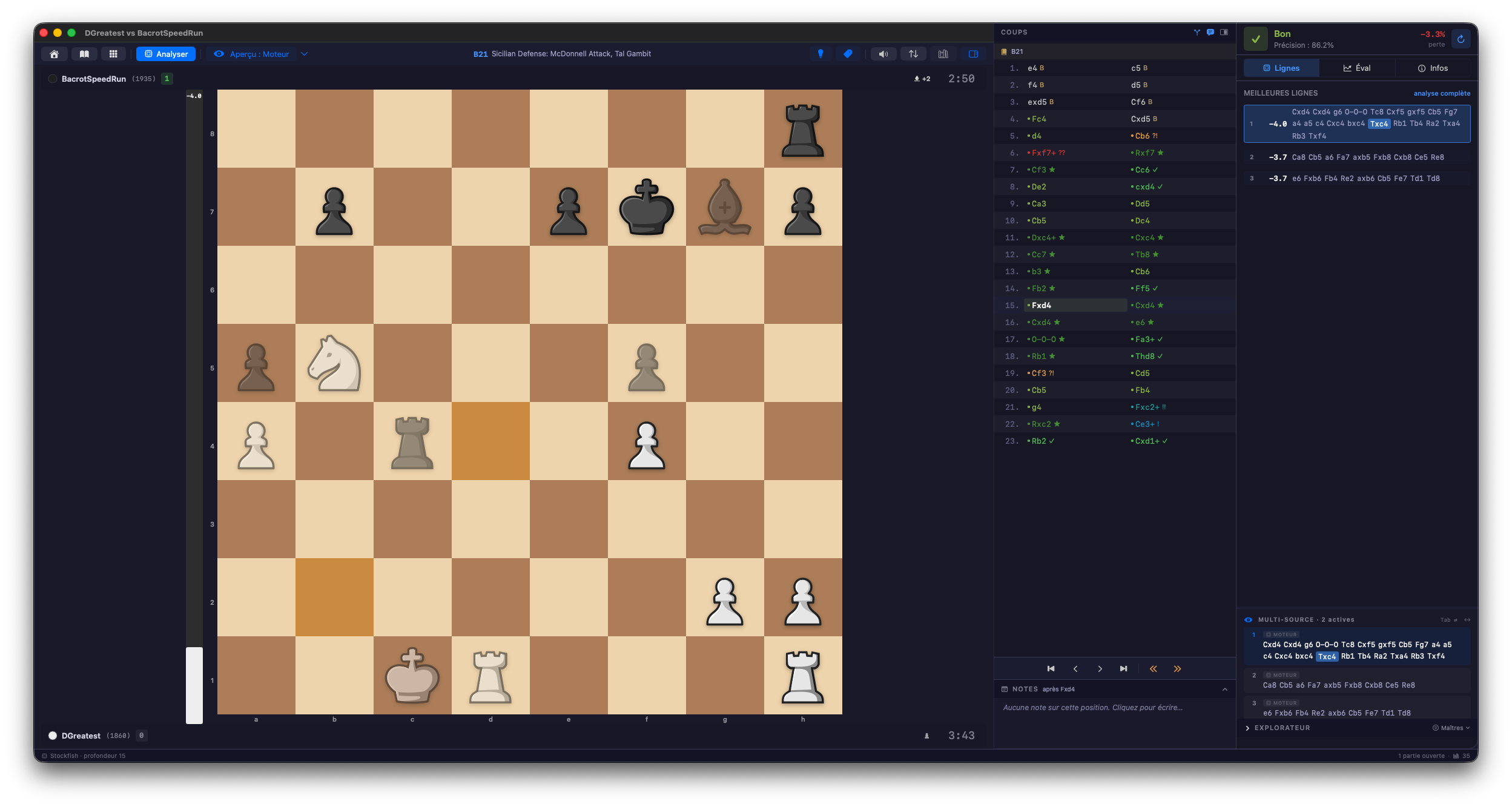 Ghost pieces play out the expected continuation — here, the engine’s best line.
The use that builds progress
Replay one of your games with Preview set to your study: at every move, the projection shows what your repertoire expected — the gap between learned theory and the move actually played jumps out. The same mechanism powers repertoire training, detailed in the Studies & repertoire chapter.
With the Book source, Preview becomes a silent opening teacher: as long as the ghosts and the played moves coincide, the game is “in theory” — the first divergence marks exactly where the work begins.